URL Short

In simple words, URL shortener maps an arbitrary long sequence of character ( original, long crappy url ) into a short and slick sequence of characters. This is nothing but Hashing, which is most commonly used to create lookup tables, HashMap, md5 Hash for cryptographic purposes etc.

To understand the URL-Shortening process I have created a demo project on GitHub and also a blog post. Do refer to this and let me know if it was helpful.


URL Shorteners :

Well, so you are tweeting about this amazing video which you think would be a big hit on the social media. You open your twitter account, copy the URL and paste it to tweet, but wait ! The URL itself is 140+ characters, let alone your quirky comments.

And then you hear about these amazing tools called – URL Shorteners. They convert the dirty looking urls into short, sweet and slick urls, which can not only be easily shared on twitter and other media but they also provide you a hell lot of analytics and user information.

Here are some commonly used URL shorteners :

  1. bit.ly
  2. goo.gl
  3. ow.ly

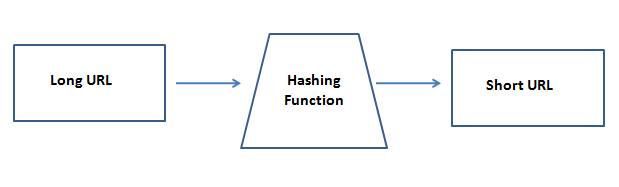
Let us paraphrase what URL shortening tools do. They convert a long arbitrary length of string into a short and compact combination of characters, which has much smaller length than the original URL. So if we understand this, we also understand that essentially these tools are just mapping one set to another, but where one set is very large, probably infinite where as the other is a smaller and finite set. Does this sound a bit familiar to the computer science guys ? Yes this is Hashing ! It has wide usage from designing a HashMap, Lookup tables to creating a md5 hash for cryptographic purpose.
hashing

But why hash when you can use random short strings ?

Yes. This is a valid approach. The original long url would be mapped to a short sequence of random strings. One reason where hashing would have advantage over random strings is, if for some reason my database crashes and I do not have a backup then I would not be able to recover the short url even if I managed to pull the old long url (say from some other user account data, app logs etc). Hashing will guarantee me that it will reproduce the same old short url for the original url. Just a design perspective we might consider while building this app.


 

URL Demo Project

A demo project

Let us create a small django project to uderstand how URL shortening work. You may fork my project url-shortener from the GitHub.

After forking the above repo, change the log path in shorturl/settings.py and run the application by typing the following command

python manage.py runserver

This will create the shorturl/db.sqlite3 file. After this run the DB migrations to create the required tables by using the following command.

python manage.py migrate

This is how the home page looks.

url-shortener-home

Compact URL

url-shorten


The heart of the project is to understand how to write a good Hashing function.

Let us look at the the model.py inside the smallify app in the above project.

class URL(models.Model):
    original_url = models.CharField(max_length=300, unique= True)
    shortened_url = models.CharField(max_length=30, unique =  True)
    
    def shorten_url(self):
        self.shortened_url = self.__fnv_hash(self.original_url)
        
        if(len(self.shortened_url) >= len(self.original_url)):
            self.shortened_url =  self.original_url
        
        
    @staticmethod
    def __fnv_hash(key):
        h = 2166136261
        
        for k in key:
            h = (h*16777619)^ord(k)
        
        # Return 8 bit URL
        return base64.encode(h%281474976710656)
    
    def __str__(self):
        return models.Model.__str__(self)  

It makes use of the FNV hashing algorithm. Look at the private method __fnv_hash in the above code snippet. It converts an arbitary length of string key into a 8 bit URL. Here every character of the key (original url) is XORed with a random integer h which is also multiplied at each stage to get a good folding effect. XORing gives a good uniform distribution. After this we encode the given integer to base64. Like a binary base has only 2 digits to represent every possible number, base64 uses 64 different characters. This gives us a more compact representation of the integer h. Finally, we do modular division by (281474976710655 + 1) to get a 8 bit compact URL.

Why 281474976710656 ?

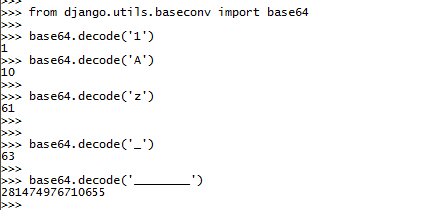
As we can see from the below commands, the 64th character (starts with 0 to 63) is an underscore " _ ". So the value of 8 consecutive " _ " is 281474976710655 and hence we do a modular division with (281474976710655 + 1)

encoding-url-shortener

With this, we have some basic understanding of URL Shorteners. The demo project url-shortener in quite naive and created for this tutorial. Do check it out and let me know if you have any improvements in it. Feel free to send a pull request and looking forward to your views, opinions, and tips in the comments below.

URL Shortener

Input your long web address BY CLICKING ON THIS LINK

and something like

https://www.google.com/maps/place/University+of+Phoenix+Stadium/@33.5276224,-112.2752123,14z/data=!3m1!5s0x872b404828c7c8d3:0x7878fa75abac5570!4m5!3m4!1s0x872b40484caa40dd:0xb9c497aa9569305b!8m2!3d33.5276224!4d-112.2625601

will be changed to

www.XML3.com/stadium

  • AdFoc.us
  • Bitly
  • ouo.io

Open Office Shortcuts

Open Office Shortcuts

Table 1: Spreadsheet navigation shortcuts

Shortcut Keys Effect
Ctrl+Home Moves the cursor to the first cell in the sheet (A1).
Ctrl+End Moves the cursor to the last cell on the sheet that contains data.
Home Moves the cursor to the first cell of the current row.
End Moves the cursor to the last cell of the current row in a column containing data.
Ctrl+Left Arrow Moves the cursor to the left edge of the current data range. If the column to the left of the cell that contains the cursor is empty, the cursor moves to the next column to the left that contains data.
Ctrl+Right Arrow Moves the cursor to the right edge of the current data range. If the column to the right of the cell that contains the cursor is empty, the cursor moves to the next column to the right that contains data.
Ctrl+Up Arrow Moves the cursor to the top edge of the current data range. If the row above the cell that contains the cursor is empty, the cursor moves up to the next row that contains data.
Ctrl+Down Arrow Moves the cursor to the bottom edge of the current data range. If the row below the cell that contains the cursor is empty, the cursor moves down to the next row that contains data.
Ctrl+Shift+Arrow Selects all cells containing data from the current cell to the end of the continuous range of data cells, in the direction of the arrow pressed. If used to select rows and columns together, a rectangular cell range is selected.
Ctrl+Page Up Moves one sheet to the left. In the page preview it moves to the previous print page.
Ctrl+Page Down Moves one sheet to the right. In the page preview it moves to the next print page.
Page Up Moves the viewable rows up one screen.
Page Down Moves the viewable rows down one screen.
Alt+Page Up Moves the viewable columns one screen to the left.
Alt+Page Down Moves the viewable columns one screen to the right.
Shift+Ctrl+Page Up Adds the previous sheet to the current selection of sheets. If all the sheets in a spreadsheet are selected, this combination only selects the previous sheet. Makes the previous sheet the current sheet.
Shift+Ctrl+Page Down Adds the next sheet to the current selection of sheets. If all the sheets in a spreadsheet are selected, this combination only selects the next sheet. Makes the next sheet the current sheet.
Ctrl+* Selects the data range that contains the cursor. A range is a contiguous cell range that contains data and is bounded by empty row and columns. The “*” key is the multiplication sign on the numeric key pad.
Ctrl+/ Selects the matrix formula range that contains the cursor. The “/” key is the division sign on the numeric key pad.
Enter — in a selected range By default, moves the cursor down one cell in a selected range. To specify the direction that the cursor moves, choose Tools > Options > OpenOffice.org Calc > General.

>> MAIN PAGE <<

View Robert’s Task List Page – – R0b3rt Programming

CYNTHIA CLICK HERE


Contact Robert Andrews at 602 ~ 999 ~ 4120

RobtAndr C-Panel

Tutavo
RobtAndr
X
Frequent References External References

Leet Speak

LeetSpeakMaviraWiki

Check out my Philadendron

This sentence will be converted to LeetSpeak first, then run through Mavira Encryption.

+|-|!5 53|\\|+3|\\|(3 \\|/!11 83 (0|\\|\\/3|2+3|) +0 133+5|>34|( |#!|25+, +|-|3|\\| |2|_||\\| +|-||20|_|6|-| |\\/|4\\/!|24 3|\\|(|2`/|>+!0|\\|.

48d9a76790c57046a849ccade60fb05bc127d178569b33f6468f3068fe7b5a8b1bcd7d0ba5a234b5492551c0e6b5e72a9b0a63e5c886f56af08e633d69d515340021a0bd82198e467d57e5aec4261915d347378c174ef17d4ea9c19e403540fa65312ae237a21ebdf2ca19650eb340bc8c04a21b0cbff9c8589713593b1582c1b92c6757ef4ede7fba6cece9c99be002bab1ed