Drive Maps

Terminal: Sudo rm -r [ DRAG HERE ] – – – – PW: 7844aa

CYNTHIA – CLICK HERE

Drive LIVE Contents Summary BACKUP Summary
Dropbox Live and Very Active C
A – 5 TB Live < 5 years C
B – 8 TB Live 5-10 years D
F – 1 TB Live Audio Files
E did not power up
P – curr other – 1 TB
√ G – 2 TB H? Live Memorabilia √ K – 2 TB
√ J Marshall All Archives over 10 years old none – S ? Thumb ?
S Perhaps Archives over 20 years old – see cooking none – ? Thumb ?
M N G-Raid Both are FAILING X
√ N Marshall
  • £ Entertainment
    • Live A/V Files and movies
    • W :: # – A – E :: Incl Excercise
    • X :: F – L :: Incl Language and Horror
    • Y :: M – R :: no Sub Dirs
    • Z :: S – Z :: no Sub Dirs
• T Back
• U Back
• V Back
•W Video A-E
• X Video F-L
• Y Video M-R
• Z Video S-Z
R – 500 GB Installation Files none ?!?! H or K (2)?
S Cooking Pics, AV, Books, etc none ?!?
Evaluate Drive E for old non-critical non-memorabilia backups
x x x

Directory Structure within most directories

  • Keep very active files in Dropbox ACTIVE folder
  • Directories
    • ACTIVE
      • Business
        • Jessit
        • VidHist
        • Valley Web – Non web files
      • Cooking
      • Finances
      • Health
      • House and Home
        • 7844
      • Vacation
      • WORKING – Currently being edited
    • FAIRLY STATIC
      • Memorabilia
        • Vacation
        • Family
      • Library
      • Entertainment
      • Valley Web Snapshots
    • RBA ACTIVE
      • Valley Web Services – Backups and Images

    • YEARLY GROUPS and SUB GROUPS
      • 1900s (As many as 20 sub directories)
      • 2000 – 2008 (9 sub directories)
      • 2009 – 2014 (6 sub directories)
      • 2015 – 2017 (3 sub directories)
      • 2018 – 2019 (2 sub directories)

ACTIONS CURRENTLY IN OPERATION

Drive Action Notes about Action Done
Recipe Box Dropbox Public
Health Records Drop/Active/HH/Health
Vault – Entertainment Standardize
Rovey Applications and Appeals Standardize
Prepare Financial Summary for Meeting Standardize
B LIVE – Cooking Standardize
B Mirror – Dropbox Standardize

Combine Dupe Directories

® Finish Dropbox organization

How it works

When you click on a link like that, an HTTP request is send to their server with the full URL, like http://bit.ly/duSk8wK (links to this question). They read the path part (here duSk8wK), which maps to their database. In the database, they find a description (sometimes), your name (sometimes) and the real URL. Then they issue a redirect, which is a HTTP 302 response and the target URL in the header.

This direct redirect is important. If you were to use files or first load HTML and then redirect, the browser would add TinyUrl to the history, which is not what you want. Also, the site that is redirected to will see the referrer (the site that you originally come from) as being the site the TinyUrl link is on (i.e., twitter.com, your own site, wherever the link is). This is just as important, so that site owners can see where people are coming from. This too, would not work if a page gets loaded that redirects.

PS: there are more types of redirect. HTTP 301 means: redirect permanent. If that would happen, the browser will not request the bit.ly or TinyUrl site anymore and those sites want to count the hits. That’s why HTTP 302 is used, which is a temporary redirect. The browser will ask TinyUrl.com or bit.ly each time again, which makes it possible to count the hits for you (some tiny url services offer this).

COMMENTS:

Actually I think, Bit.ly uses HTTP 301 instead of 302 (the last I heard)

Since bit.ly won’t let you change where one of their URLs points to, 301 makes sense. No need to remember the bit.ly version and recheck it.

it is indeed HTTP 301 that is used, however, with a timestamp. This turns it into a Moved not Moved Permanently. This is a subtle difference. By adding the timestamp, the browser considers it should check whether the resource is changed or not when this timeout it reached. Others, like is.gd, use a normal 301 Moved Permanently and the browser doesn’t need to re-check (but often will). Finally, services like url4.eu do not redirect at all, but show you an advertisement first. With the 301 the services can still count unique visitors, but not all hits.


URL How-to

Others have answered how the redirects work but you should also know how they generate their tiny urls. You’ll mistakenly hear that they create a hash of the URL in order to generate that unique code for the shortened URL. This is incorrect in most cases, they aren’t using a hashing algorithm (where you could potentially have collisions).

Most of the popular URL shortening services simply take the ID in the database of the URL and then convert it to either Base 36 [a-z0-9] (case insensitive) or Base 62 (case sensitive).

A simplified example of a TinyURL Database Table:

ID       URL                           VisitCount
 1       www.google.com                        26
 2       www.stackoverflow.com               2048
 3       www.reddit.com                        64
...
 20103   www.digg.com                         201
 20104   www.4chan.com                         20

Web Frameworks that allow flexible routing make handling the incoming URL’s really easy (Ruby, ASP.NET MVC, etc).

So, on your webserver you might have a route action that looks like (pseudo code):

Route: www.mytinyurl.com/{UrlID}
Route Action: RouteURL(UrlID);

Which routes any incoming request to your server that has any text after your domain www.mytinyurl.com to your associated method, RouteURL. It supplies the text that is passed in after the forward slash in your URL to that method.

So, lets say you requested: www.mytinyurl.com/fif

“fif” would then be passed to your method, RouteURL(String UrlID). RouteURL would then convert “fif” to its base10 equivalent, 20103, and a database request will be made to redirect to whatever URL is stored under the ID 20103 (in this case, www.digg.com). You would also increase the visit count for Digg by one before redirecting to the correct URL.

This is a really simplified example but you should be able to get the general idea.


  • Good additions, esp. the part on the encoding.Abel Oct 13 ’09 at 21:00
  • 1
    really its that easy. I hate when I don’t think of the simple things.Nathan Feger Dec 19 ’09 at 0:48
  • 1
    what is a good heuristic to generate random shortened urls?Saher Ahwal Oct 28 ’11 at 23:36
  • 10
    Thanks for the nice explanation. So what happens when someone tries to create a short URL for an already existing long URL? Do they perform a full text search on the database? I do not think so as it will be too much time consuming. Hash or message digest based approach looks more practical.Piyush Kansal Oct 2 ’13 at 7:13
  • @PiyushKansal you could use the hash internally to do a O(1) lookup to find duplicates; and then route the existing tiny URL for that, or could choose to generate a new one. As far as I can tell, goo.gl reuses the tiny urls for the same URL; try this on your end for this page: Do you get this >> goo.gl/8gVb8X ?Kingz Jun 4 ’18 at 16:29
  • As an extension to @A Salcedo answer:

    Some url shortening services (Tinyarro.ws) go to extreme by using Unicode (UTF-8) to encode characters in shortened url – which allows higher amount of websites before having to add additional symbol. Since most of UTF-8 is accepted for use ((IRI) RFC 3987 handled by most browsers) that bumps from 62 sites per symbol to ~1,112,064.

    To put in perspective one can encode 1.2366863e+12 sites with 2 symbols (1,112,064*1,112,064) – in November 2009, shortened links on bit.ly were accessed 2.1 billion times (Around that time, bit.ly and TinyURL were the most widely used URL-shortening services.) which is ~600 times less than you can fit in just 2 symbols, so for full duration of existence of all url shortening services it should last another 20 years minimum till adding third symbol.


URL Short

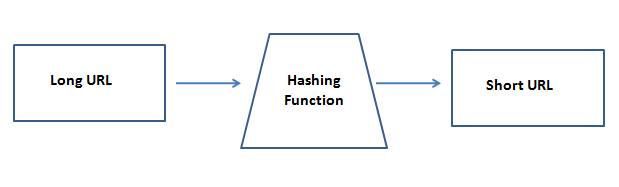
In simple words, URL shortener maps an arbitrary long sequence of character ( original, long crappy url ) into a short and slick sequence of characters. This is nothing but Hashing, which is most commonly used to create lookup tables, HashMap, md5 Hash for cryptographic purposes etc.

To understand the URL-Shortening process I have created a demo project on GitHub and also a blog post. Do refer to this and let me know if it was helpful.


URL Shorteners :

Well, so you are tweeting about this amazing video which you think would be a big hit on the social media. You open your twitter account, copy the URL and paste it to tweet, but wait ! The URL itself is 140+ characters, let alone your quirky comments.

And then you hear about these amazing tools called – URL Shorteners. They convert the dirty looking urls into short, sweet and slick urls, which can not only be easily shared on twitter and other media but they also provide you a hell lot of analytics and user information.

Here are some commonly used URL shorteners :

  1. bit.ly
  2. goo.gl
  3. ow.ly

Let us paraphrase what URL shortening tools do. They convert a long arbitrary length of string into a short and compact combination of characters, which has much smaller length than the original URL. So if we understand this, we also understand that essentially these tools are just mapping one set to another, but where one set is very large, probably infinite where as the other is a smaller and finite set. Does this sound a bit familiar to the computer science guys ? Yes this is Hashing ! It has wide usage from designing a HashMap, Lookup tables to creating a md5 hash for cryptographic purpose.

hashing

But why hash when you can use random short strings ?

Yes. This is a valid approach. The original long url would be mapped to a short sequence of random strings. One reason where hashing would have advantage over random strings is, if for some reason my database crashes and I do not have a backup then I would not be able to recover the short url even if I managed to pull the old long url (say from some other user account data, app logs etc). Hashing will guarantee me that it will reproduce the same old short url for the original url. Just a design perspective we might consider while building this app.


URL Demo Project

A demo project

Let us create a small django project to uderstand how URL shortening work. You may fork my project url-shortener from the GitHub.

After forking the above repo, change the log path in shorturl/settings.py and run the application by typing the following command

python manage.py runserver

This will create the shorturl/db.sqlite3 file. After this run the DB migrations to create the required tables by using the following command.

python manage.py migrate

This is how the home page looks.

url-shortener-home

Compact URL

url-shorten


The heart of the project is to understand how to write a good Hashing function.

Let us look at the the model.py inside the smallify app in the above project.

class URL(models.Model):
    original_url = models.CharField(max_length=300, unique= True)
    shortened_url = models.CharField(max_length=30, unique =  True)
    
    def shorten_url(self):
        self.shortened_url = self.__fnv_hash(self.original_url)
        
        if(len(self.shortened_url) >= len(self.original_url)):
            self.shortened_url =  self.original_url
        
        
    @staticmethod
    def __fnv_hash(key):
        h = 2166136261
        
        for k in key:
            h = (h*16777619)^ord(k)
        
        # Return 8 bit URL
        return base64.encode(h%281474976710656)
    
    def __str__(self):
        return models.Model.__str__(self)  

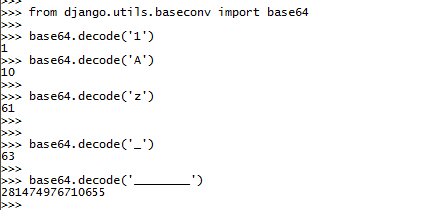
It makes use of the FNV hashing algorithm. Look at the private method __fnv_hash in the above code snippet. It converts an arbitary length of string key into a 8 bit URL. Here every character of the key (original url) is XORed with a random integer h which is also multiplied at each stage to get a good folding effect. XORing gives a good uniform distribution. After this we encode the given integer to base64. Like a binary base has only 2 digits to represent every possible number, base64 uses 64 different characters. This gives us a more compact representation of the integer h. Finally, we do modular division by (281474976710655 + 1) to get a 8 bit compact URL.

Why 281474976710656 ?

As we can see from the below commands, the 64th character (starts with 0 to 63) is an underscore " _ ". So the value of 8 consecutive " _ " is 281474976710655 and hence we do a modular division with (281474976710655 + 1)

encoding-url-shortener

With this, we have some basic understanding of URL Shorteners. The demo project url-shortener in quite naive and created for this tutorial. Do check it out and let me know if you have any improvements in it. Feel free to send a pull request and looking forward to your views, opinions, and tips in the comments below.

URL Shortener

Input your long web address BY CLICKING ON THIS LINK

and something like

https://www.google.com/maps/place/University+of+Phoenix+Stadium/@33.5276224,-112.2752123,14z/data=!3m1!5s0x872b404828c7c8d3:0x7878fa75abac5570!4m5!3m4!1s0x872b40484caa40dd:0xb9c497aa9569305b!8m2!3d33.5276224!4d-112.2625601

will be changed to

www.XML3.com/stadium

  • AdFoc.us
  • Bitly
  • ouo.io